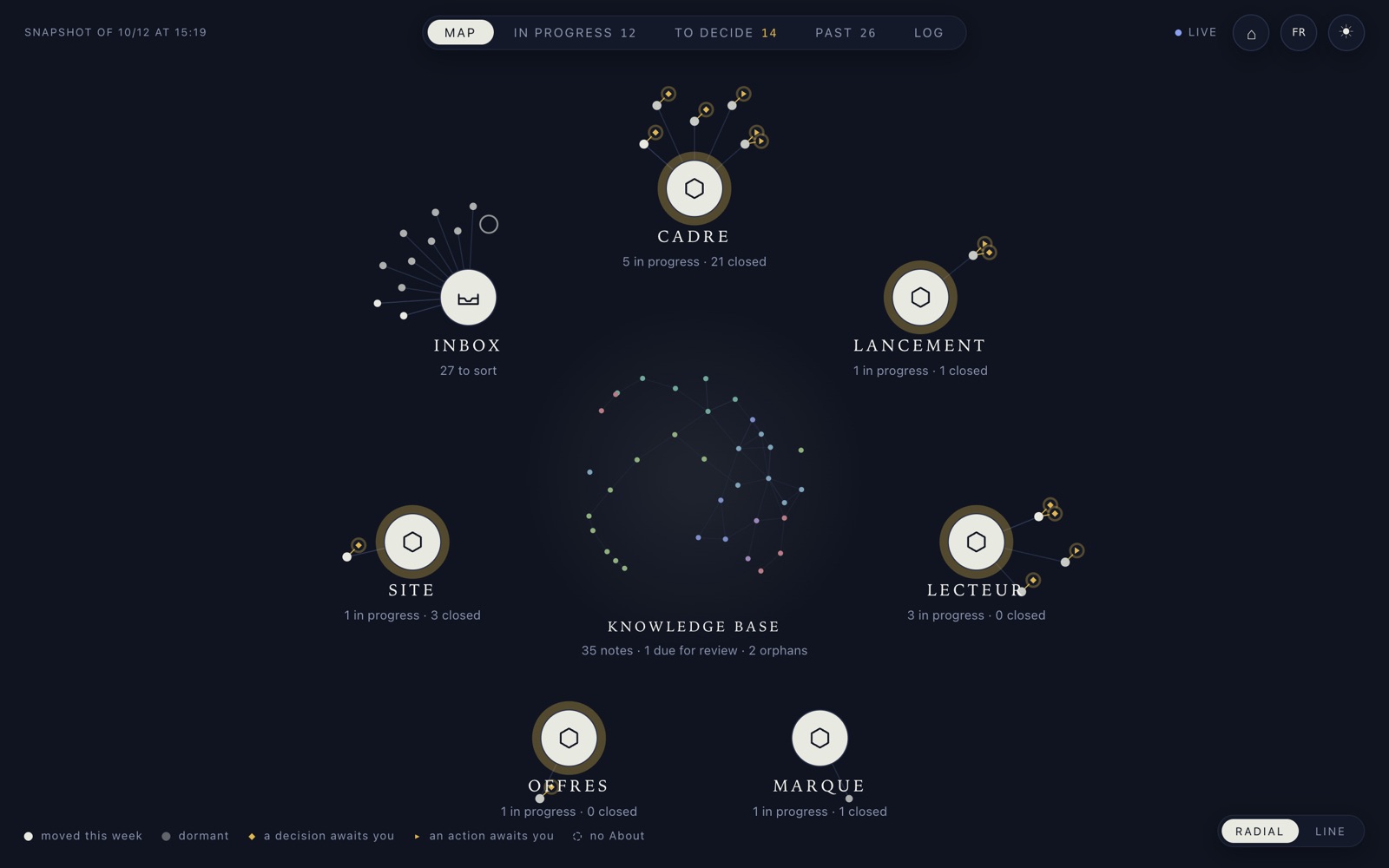
Manence organizes your projects with your AI agent: each one has its own space, its documents and its record. You can see what is moving forward, what is stuck, and the decisions waiting for you.
The AI keeps that space up to date while it works and tidies it when the project closes. Useful knowledge is kept in your knowledge base. Mistakes that get spotted are fixed, and the fix is written down.

Each domain with its workstreams: the ones that moved this week, the ones waiting for a decision, your knowledge base in the middle.
The decisions and actions waiting for you, oldest first, with the workstream they belong to and how many days they have been waiting.
A finished workstream, opened on its files and its record: every decision is dated, with what was ruled out and why.
In Manence, a project is a workstream: a dated folder on your machine, with its documents and a record that states the goal, what has been decided and what is waiting.
You tell your agent: “open a workstream for the new home page”. It creates the folder and the record, with the goal and the context. It is an ordinary folder: you open it in the Finder or in File Explorer, you drop a mockup in it, you reread a draft there.
About.md the record: goal, decisions, closing proposition-section.md the proposed section, EN and FR video-parcours-clair-en.mp4 the take that was kept carte-radiale-clair-en.png the screenshot of 22 September rendu-desktop-en.png the render checked before the PR rendu-mobile-en.png
The agent keeps the record while the work goes on. A decision that has been made is dated, with its reason and what was ruled out. A decision still to be made is listed separately, with who has to make it and since when.
## Decisions 12 Oct, Alexandre: the hero is his own text (four versions ruled out […]: too much “AI copy”); […] “See how it works” first; a “Works with” row Claude · OpenAI · Grok, Mistral held back until a real trial. awaiting: - who: alexandre what: "[…] align the title, the meta description and the footer (FR and EN) on “reliable over time” […]" kind: decision since: 2026-10-12
A week later, or in a fresh session, you ask “where are we?”. The agent reads the record and picks up with the context. Manence UI, above, gives you the same thing as an overview.
> where are we on the site? Workstream site/refonte-manence-site (opened 6 July) Live home v5, since 8 July Decisions 8 Jul Slate theme by default, independent of the OS. 8 Jul No two doors before the public release. Why: the repo was private. We don't show a door we cannot open. 10 Jul The repo is public. The condition is lifted. So the waitlist goes, the two doors open.
Once it is delivered and approved, close-work files the folder among the finished workstreams, under the same name. Then it looks at what the workstream leaves behind: lasting facts go into your knowledge base, each release gets a date to measure its effect, and the log records what was delivered and what was learned, failures included.
## Closing Closed on 2026-09-23 (close-work), status: validated. Distilled: knowledge-base/produit/manence-ui.md (public presence) and knowledge-base/ops/systemes.md (home § 1-8, “dated proof” rule). Measurement scheduled: inbox/2026-09-23-mesure-home-manence-ui.md (weekly-review of 2026-10-06).
You run the weekly review, or you ask “where are we?”. The agent sifts through your system and hands you a summary.
In it: the workstreams that have not moved in two weeks, the decisions that have been waiting for you too long, what is sitting in the inbox, the knowledge base pages due for a recheck, and whether a newer version of Manence is out. It proposes; it fixes nothing without you. It is a skill you run; you can also schedule it as a weekly routine. Nothing runs on its own unless you decided it.
A case from my own use, at Intuition Software, which has developed and published the Jobaffinity ATS since 2009.
What the system brings here: the workstream was already connected to both tools, and the anomaly did not end up in a conversation. It left a trace.
## [2026-06-14] fix | Web lead attribution Lead “DIRECT, no source”: CRM × analytics cross-check → true origin reconstructed: Brave Search, ~11 am (tracker blocked by an ad blocker). Measured: 39% of web leads (28/71) mislabeled for weeks. Analysis delivered. Fix deployed the same day.
Proof of practice, not of adoption: the system was built by running them.
The company behind the Jobaffinity ATS: strategy, CRM, lead pipeline, support, daily monitoring, all logged.
Manence, and the site you are reading, built and run under Manence.
declic.media, over 200 articles in three languages, a newsletter, editorial workflows. The first account of this method is online there: “AI is great… at first”.
A Manence system is a folder on your machine: markdown and a git repository. You open every document without Manence UI, with whatever text editor you like.
If you switch agents, the knowledge base, the log and the workstreams carry over as they are: nothing in there depends on an agent. Skills come along, in the Agent Skills format; only their hookup changes. Guardrails keep their mechanism, each tool has its own dialect. Subagents do not carry over.
Verified in real sessions: Claude Code (the native path, on macOS, Linux and Windows), OpenAI Codex and Grok Build. The detail, layer by layer: PORTABILITY.md. The full architecture: the documentation.
One command sets up a system in ~/manence.
curl -fsSL --proto '=https' --tlsv1.2 https://manence.ai/install.sh | bash
Open Claude Code in the core (cd ~/manence/core then
claude) and tell it: “run my first setup”. It asks your language,
the name of the business, what it does, who works here, the voice, the direction, and fills in the system's identity with your answers.
“open a workstream for ‹something you're working on this week›”. No exercises: real work.
Manence is free: MIT code, CC BY-NC-SA doctrine. The agent has its own cost, set by its vendor; it is not included in Manence.
To understand the why before installing: the Manifesto. A partnership, a collaboration, a business need? Write to me.
Anyone who works with an AI agent on projects that last longer than one conversation: a freelancer, a small team, an executive following several topics at once. It was built on my three ventures, above. It asks you to be comfortable with a terminal and a folder of files.
git, bash, jq, python3 and Claude Code, on macOS, Linux or Windows with Git Bash. And a real project for the first workstream.
An agent with skills knows how to do things. Manence gives it where to write and what to keep: one workstream per project, a record, a decision log, a knowledge base kept apart from drafts, and opening and closing steps. Your skills stay yours; they take their place in the system.
No. Opening, keeping up to date, filing and distilling are the agent's moves, described in its skills. You decide, you approve, you reread. You can also file things yourself when you want to: these are your folders.
Yes for the knowledge base, the log and the workstreams: markdown and git, nothing else. Skills come along in the Agent Skills format, with a hookup to redo. Guardrails and subagents need adapting for each tool. Verified in real sessions: Claude Code, OpenAI Codex, Grok Build.
The system is a folder on your machine, versioned with git. There is no Manence server, no account, no telemetry. What your agent sends to its model is a matter between the agent and its vendor, not Manence.
Not available: the repository is private, with no promised date. Not required: a Manence system is complete without it. It reads what the system writes and writes nothing itself; the same information is in the documents of the folder.
With an AI, it's great at first.
With Manence, that's only the beginning.